Freelance Felons 2
About the Project
Freelance Felons 2 is a spiritual successor of a past unity project of mine designed to test everything I have learnt to far in unreal engine and C++. It will be a story game with missions and cutscenes, where the character plays a fixer, someone without any affiliations that people with problems can employ. This could be a simple collection or a contract killing, as long as the price is right, and these missions can be played out among a bustling tropical island full of life and fully explorable. This is of course all with the help of a huge fleet of drivable vehicles and arsenal of weapons to use however players desire, as long as they’re willing to face the legal consequences of the unforgiving police department.
All of the code for this project can be found on my Github here.
Dev Log
Combat Day 13 - Bug Fixes
27/08/26
I spent the first part of my day finally fixing the car entry and exit whilst holding weapons, using the occupied system I recently created. My main issue today was finding the best time to set the variable to ensure it wouldn’t feel disruptive to the player.
Combat Day 12 - Bug Fixes
26/08/26
Today I started by improving my engine audio from yesterday, making it progressively get louder across a cars entire speed range rather than just past a certain threshold. This made a massive improvement to the games UX, allowing the player to feel like they are indeed going faster from the audio cue rather than having to debate if the car looks quicker, as well as bringing much more realism and immersion to the game. More Importantly though I wanted to fix a bug where the player wouldn’t correctly leave a car after entering with a weapon equipped, and a separate bug where that weapon would remain visible whilst driving. I started with the visibility which shaped up to be much harder than I was expecting due to the separate nature I wanted the vehicle and character classes to have, however using the controller as the middle man it was intended to be I eventually got both the the character and weapon to be visible and hidden at the correct times. More importantly though I had an issue where with a weapon equipped the player wouldn’t close the door after leaving a car which, while seeming trivial, meant that important anim notifies were being skipped and states were being messed up. I found out this was because of the turn in place animations interrupting them which lead me down the rabbit hole of creating a occupied / unoccupied system for the player. This allows me to block certain actions and systems whilst the character is occupied which stopped the interruption and allows the notify to trigger. However I now still have an issue where after the player seemingly exits a vehicle whilst holding a weapon without any problems, when they attempt to enter another vehicle, it locks the character in place without even attempting to open the car door. The good news is I have it still narrowed down to my turning in place script as when I remove it from tick all my issues go away, but that’s a problem for next time, I’m tired.
Combat Day 11 - Animations Complete
25/08/26
Today my main goal was finally completing the turn in place animations, which whilst finally logically correct just looked clunky. To do this I experimented with different interpolation rates and more importantly different animations that exaggerated the footsteps without adding twists or snaps to the upper body. After this I am finally happy with the animations being in a playable and presentable state. After this I spent some time adding different speeds for when the player had a weapon equipped or was aiming as it didn’t make sense to me that carrying a weapon or focusing on aiming didn’t remotely affect the characters speed, but this also incentivises the player to unequip weapons when there is no imminent danger with the perk of more speed, but trade off of not being gunfight ready. This loop gives the player more to think about and makes fights more engaging. Finally I also added engine sounds to vehicles following on from my last session. To do this I created a metasound that randomises the volume and pitch slightly to create variation in different vehicles, and then used the vehicles speed to calculate a pitch multiplier that makes the engine sound like its revving more at higher speeds. Overall after a long break I’m very happy with my progress today and am excited for what’s to come, as I think the game is finally ready for some weapon mechanics.
Interlude - Audio and Car Improvements
20/07/26
I started today by adding audio to all of my animations suing the sound waves and Metasounds I created yesterday. I then got fed up of a frame rate related bug where cars would bounce, which I fixed by capping the value of the final suspension force applied at each wheel to a multiplier of the cars mass. This will make this edge case bug far less noticeable and now cars only occasionally have a slight stutter. This is also because a suspension spring should never have the power anyway to launch a car however I multiply my spring force by delta time to make the suspensions performance frame independent, and now use this cap to prevent edge case frame rates.
Combat Day 10 - Equip Animations
19/07/26
Today I added Equip and Unequip animations as well as sourcing a lot of sound effects, and editing them ready to be added to animations through sound notifies.
Combat Day 9 - Animation Fixes
18/07/26
I started today by adding some checks that cancel sprinting if the character is aiming or going in a direction other than forwards with a weapon equipped. I also added some stepping animations as well as some interpolation to when the character is turning in place.
Combat Day 8 - Character Rotation
15/07/26
Today I was testing which cases needed use controller rotation yaw to be true and false, which is when I realised I needed a way for the character to look more that 90 degrees to the left or right so I added a turning state enum. this allowed me to control when and which direction to turn the character when stationary using aim offsets, but looking to far. This combined with using control rotation when moving made the movement with weapons finally have the correct feel for this genre of game. This is a system that took a lot longer to get feeling right than I thought but it was also vital to get right.
Combat Day 7 - ADS and Hip Animations
08/07/26
Today I reorganised the flow of the animation blueprint, making its layout much easier to understand and much easier to find specific state machines using cached poses. Then I created all of the required variables in the animation instance script to get the functionality working. this means it now correctly selects the right animation for unequipped and equipped, hip and ADS, as well as applying pitch and yaw to the aim offset. Next time I need to fine tune my orient to movement and aim offset yaw value to get the correct behaviour, as right now it still feels good when unequipped but when equipped I want the legs to stay still and the body to look with the mouse, but right now the legs just slide with the mouse.
Combat Day 6 - Animation Setup
07/07/26
Today I simply got as many of the animations I would need ready as I could. This included importing the animation starter pack from an earlier ue5 version, as well as some extra animations from Mixamo and retargeting them all to work on my character. I then set up all the blend spaces, created all the aim offsets and set up the flow of state machines within the ABP to keep it manageable and understandable. This included everything for both hip and ADS variants at various speeds and directions.
Combat Day 5 - Weapon Icons
21/06/26
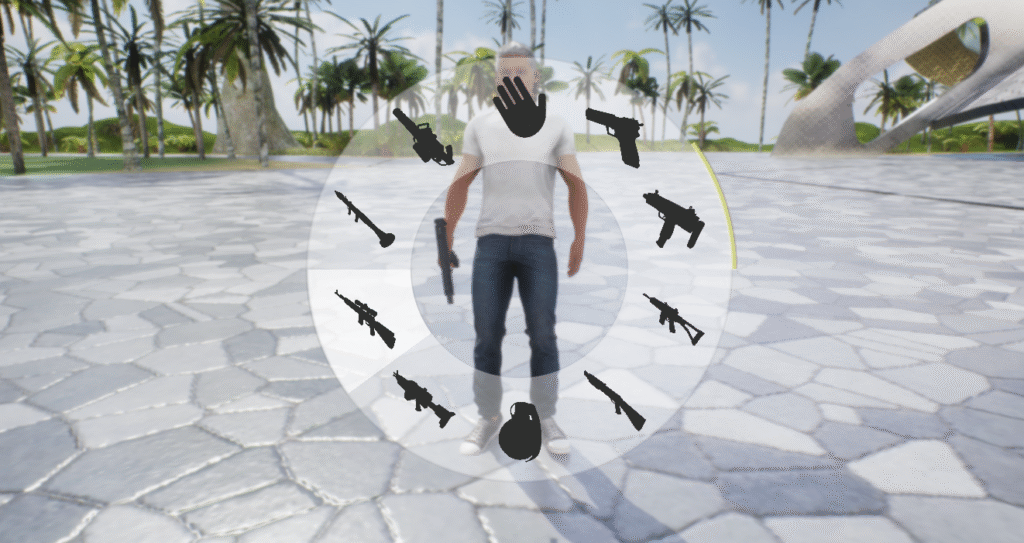
Today, I wanted to get the icons setting dynamically on the weapon wheel. I did this using a for loop in the combat component whenever the weapon selector is opened, that calls a setter on the weapon selector. This passes through the iteration for which weapon icon is being set and the weapon icon material instance that is stored on the associated weapon. In this setter a dynamic material instance is then created, before setting the brush on the weapon icon of the provided iteration. This took quite a few crashes for me to get working, but now I know how to access the variables when I only have access to the class using get default object, alongside a painful lesson in checking my pointers before use. Finally I relearnt about how I have to change the material type to user interface is using as a brush if I would like to actually see the material, even if setting it properly. Either way I am very happy with the results and can now continue with the functionality.
Combat Day 4 - Weapon Icons
17/06/26
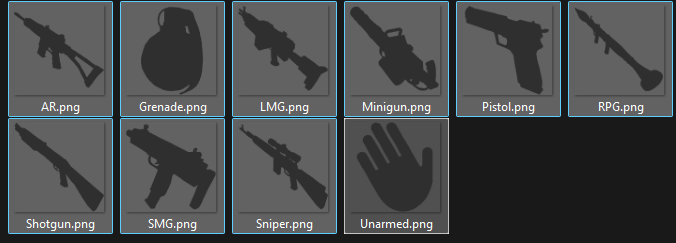
After being ill for the past few days, I decided to take it easy going back and get the icons complete, and I’m very happy with how they all turned out. I think they fit the aesthetic of the selector and the wider game, whilst also perfectly matching the models of the actual weapons for absolute clarity. Next ill just have to set up the dynamic materials I think to be able to be able to set them dynamically on the wheel.
Combat Day 3 - Weapon Equipping
14/06/26
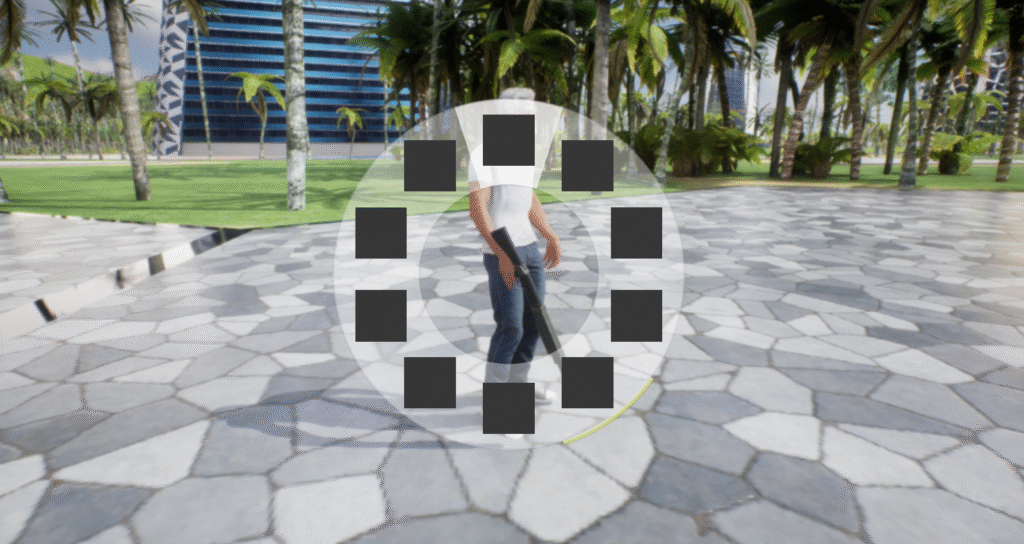
Today I started by setting up all the weapon blueprints with their static meshes, as well as adding the socket to the character mesh. I then added to the select weapon function in the combat component that, after getting the selected weapon from the weapon selector, spawns the matching blueprint in and attaches it to that socket. after populating the unlocked weapons array this meant I could now select a weapon in the wheel, it would then destroy whatever weapon I was currently holding before equipping the selected weapon, the only part missing is animations and audio.
Combat Day 2 - Weapon Selector
11/06/26
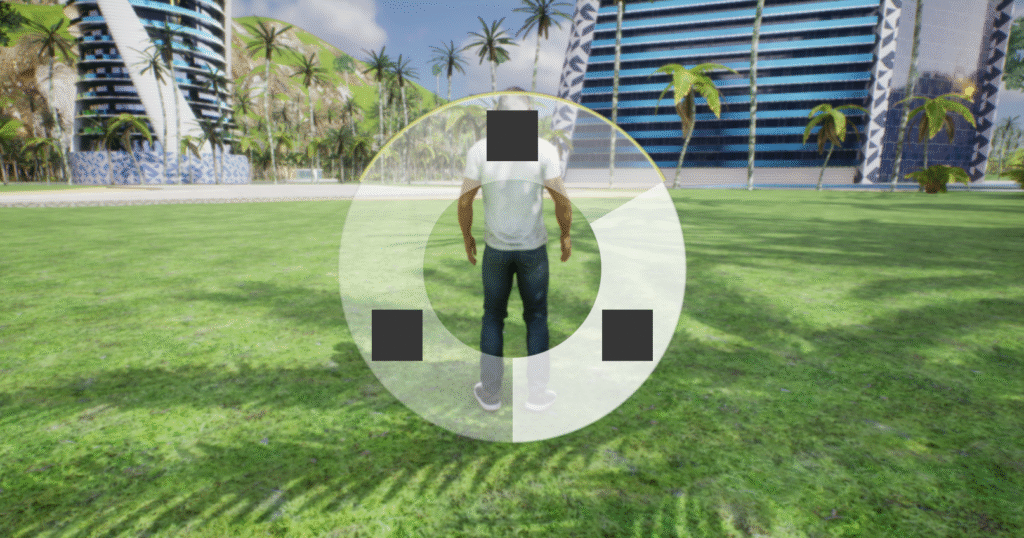
Today my main goal was to get the selector working properly, which required me to start understanding the material blueprint I set up following a guide, so I could fix it to match up with my maths. this is because it’s origin was on the right side rather in the top where I think it would make more sense, and increases anticlockwise rather than clockwise. After lots of trial and error I finally understood what enough of the nodes were doing to be able to alter and correct the maths to my liking. With the direction maths of the material fixed, all that was left was to fix the direction maths of the input to match, as it was also centred to the right as well as going from -180 to 180 rather than 0 to 360, which I achieved by adding 90 before using the modulus of the result plus 360 divided by 360. This combined with some more maths to work out which section of the circle the mouse is in and snap the inputted direction to the centre of that section and a modulus to prevent out of bounds section numbers resulted in a dynamic weapon wheel system that works exactly how I aimed. The amount of sections is then controlled by the combat component, using the number of items in an unlocked weapons array, whilst dynamically changing the size of the sections in the UI and all the calculations within the class. Finally the highlighted weapon can be selected by simply clicking, which won’t fire the currently equipped weapon in future due to the use of mapping contexts, leaving that section marked as equipped on the wheel, and updating an equipped weapon variable on the component. Finally the menu can is hidden by simply releasing the mapped key, seamlessly changing the contexts back to normal. Finally I got some placeholder square images, that will soon become weapon icons, placed correctly around the wheel. This uses similar calculations to the highlight effect, placing enough icons around the wheel for the number of sections and hiding any left over.
Combat Day 1 - Combat Component
09/06/26
I started today by brainstorming how I wanted combat to work in this game, and the flow between classes this would require. Obviously it would centre around the player shooting things however one of the big decisions was how I wanted the player to obtain weapons and equip weapons. What I settled on is that there will be one weapon of each class, and weapons will be obtained through the story from characters making the progression feel natural, and they would be equipped once obtained through a radial weapon selector like in GTA. I therefore decided that the first step to make testing these weapons much easier would be to set up this weapon selection system. I wanted it to be a circle split into sections, that dynamically divides itself as more weapons are unlocked, which it turns out was a lot harder than I thought. This led me to searching though YouTube videos until I fund one that used a dynamic material function which I thought was a great idea, so I therefore watched through that section of the video given my total lack of experience with material creation, until I had enough of the material set up to go on alone. I then set up a basic function in the C++ widget class that gets the angle from the screen centre to the mouse curser in degrees and passed that into the parameter for the material and it moved. Sadly however whilst it did move it didn’t remotely match up with the curser direction, which would have to be fixed another day.
Cars Day 22 - Cars Finished
08/06/26
Today I had one main goal, test every vehicle, make sure the entry animations lined up correctly, make sure the speed and handling were ok and make sure nothing was broken with the vehicle class in the process. This did take some time and some vehicles needed a lot more tuning than others after my basic multiplier yesterday but after a few hours this was finally finished. I also fixed one last annoying issue with the vehicle class to do with my brake multiplier that broke when starting from a standstill, sometimes not knowing if I was trying to accelerate or brake, which I fixed by only allowing braking at over 5mph and gradually increasing their strength up to 20mph. below these speeds the high dampening and and brake functionality can be used as brakes and this makes acceleration and reversing feel much better. Finally I fixed one other annoying feature, the character being an Olympic long jumper, fixed by decreasing the z velocity and increasing the falling lateral friction within the character movement component.
Cars Day 21 - Bug Fixing
07/06/26
I started my day by getting a few simple bugs fixed to get the momentum going on the simple wins. This meant first adding a couple of early returns to the exit check that first stops exit attempts if going too fast to instantly stop and exit, and then to check if the car is moving through the air. This prevents the player from exiting while jumping the car however allows the player to jump out in the event its stuck up a tree or without any wheels on the ground. With this sorted I moved on to a refined dampening system that adjusts the linear and angular dampening depending on various conditions. I started with a bunch of if else’s, however this was just resetting the same values repeatedly. I then used an integer to prevent repeating the same values however this was messy and also didn’t work, resulting in me just making the enum I should have all along. I then set the value of that enum depending on whether the cars state is parked, transitioning, if the player is actively applying driving inputs, or if the car is stationary or just rolling using the same if else’s. I then compare this newly set state to a member variable last state, and if the same the function returns early, if not the member variable is updated and a switch statement is entered to update the dampening values. However, with these issues sorted it was time to fix the frame dependant physics by multiplying any force added to the root by delta time. whilst this is a really easy fix, it also means I have to re-tune a lot of values on the cars to try and return them to how they used to feel, something I had already spend days on in the past. This included the suspension strength and dampening, the lateral friction values, the handbrake stopping force and most notably the engine force that controls the acceleration of the cars and needs fine tuning individually per vehicle. After some experimentation I found that multiplying the old values by 30 provided a good starting point which is pretty much where I am leaving them all for now, after getting everything else adjusted, however over time and testing I’m sure I will adjust the engine force of a lot of the vehicles, as well as maybe the lateral frictions and steering angles until I’m back to being happy with how all the vehicles are feeling. Also, I found that after a lag spike, the cars would literally bounce into the air to compensate for missed frames with one massive force, so to combat this I have clamped the value of Delta Time to 1/30, hopefully maintaining enough frame independence whilst preventing the physics from breaking in edge cases.
Cars Day 20 - Colour Finished
06/06/26
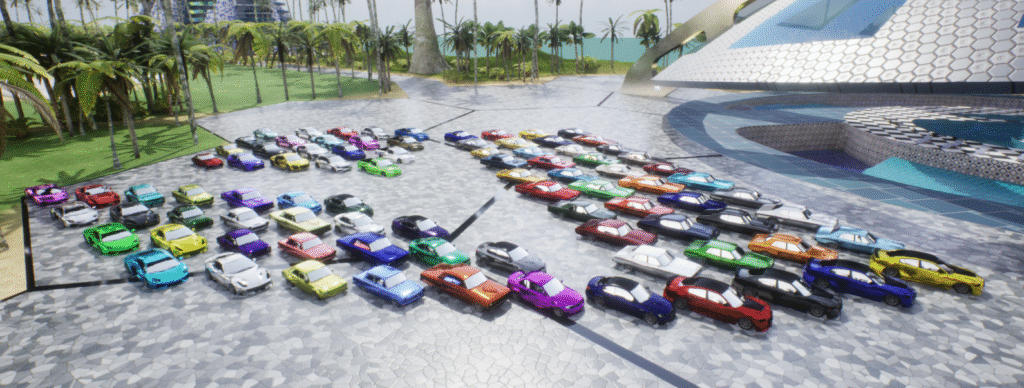
There are now 88 unique looking cars.
Cars Day 19 - Huge Mistake
05/06/26
I managed to get all of the muscle cars coloured, which took a very long time, however I made a harrowing discovery of a rookie mistake in a lot of my vehicle code, non of it is frame independent. This is causing the suspension to break in an environment full of cars and frame drops, however I’m sure it will be causing other driving issues like the occasional take-off into the air. This means I will have to re-tune all of the dependant values for all 22 of the cars, until they go back to feeling close to their current state. At least they look colourful.
Cars Day 18 - Time For Colour
04/06/26
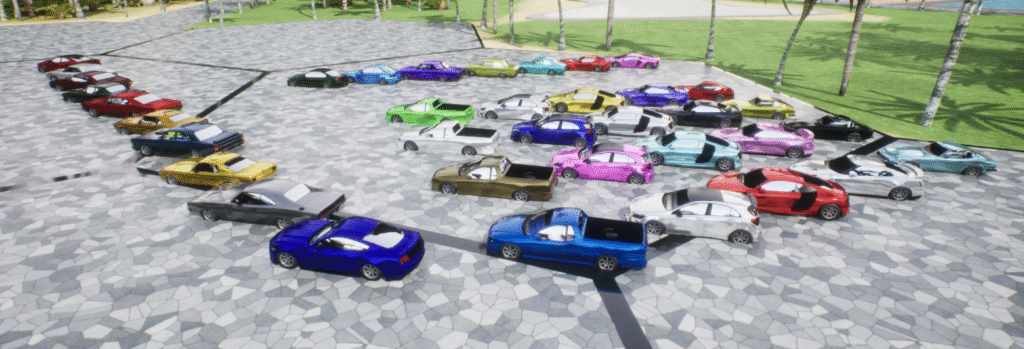
Finally, all 22 cars are drivable and all have there own distinct feeling. I also had some time to start adding different colour variation for some of the cars, working out the best way to achieve this. With this process started it should be much quicker to do in future, meaning I might even be able to complete them all tomorrow after work. Also I decided that four colours per car should be a good enough start to ensure that the world will feel diverse enough without many duplicate cars, whilst not being an absurd amount of boring repetitive work, however more colours are obviously very easy to add in future if I feel it’s needed.
Cars Day 17 - More Cars
02/06/26
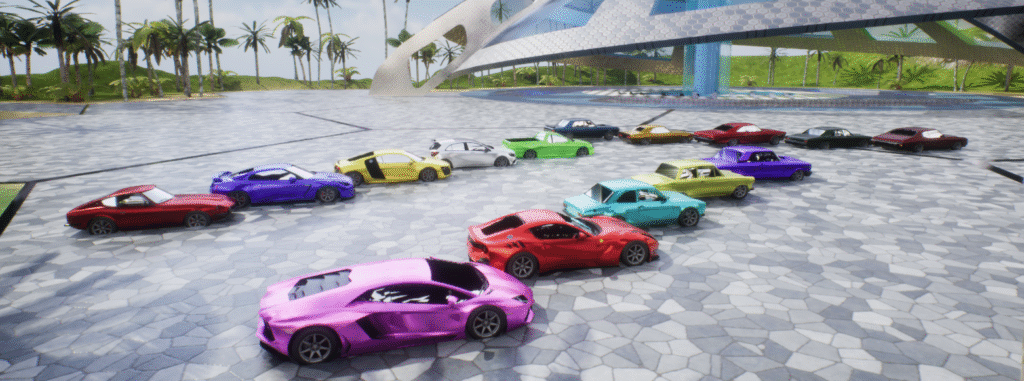
I spent all of my UE5 time today making more drivable cars, so my total is now up to 15, 7 remaining. This process is feeling much quicker now, and simply involves setting the mass, then tuning car specific values like the engine’s power, top speed and suspension ride height; then adjusting the models to fit together correctly. Then I test drive it for a little while and fine tune the more precise values until the car drives in a manner that I think suits the model and the desired game feel. I now have all coupes, hatchbacks, trucks, sedans and sports cars complete, and am half way through the muscle cars, and I’m really liking the range of vehicle styles that will populate the world giving it a bit of a Cuban feel.
Cars Day 16 - Crashout Over
01/06/26
So I started my day by learning about what wasn’t working about my car collision, for example if I disabled suspension then my cars would fall through the floor too, however it successfully used the car mesh collisions for obstacles in the environment. The only difference here was that one was query driven and one was chaos driven, which it turns out doesn’t play nice with the complex collision I was using for the car mesh collisions. Therefore to fix this I switched them back to simple collision and generated a very detailed simple collision using the auto convex feature, which fixed all my collision issues. It also turns out this is made possible by a bool called auto weld that joins the rigid bodies of the two collision volumes together allowing the physics focused root to be affected by the collision focused body. With car collisions now sorted I also came up with a much better approach to the tunnel collisions, where I yet again switched them back to simple and made my own very basic collision using the add cube collision feature in the static mesh editor, making the solution much cleaner and automatically applied to all of the tunnels around the map. Finally it was time to address the issue where my character no longer attached to certain sockets or was getting set to hidden, which after using some logs to check some pointers, ended up being caused by broken socket pointers. This was most likely after I broke the sockets in the car blueprints after re-naming one a while ago and since changed the enter and exit order of operation, but I still don’t know why this only started giving me these issues yesterday of all days. This was simply fixed my creating a new car blueprint from the exact same code, which after re-setting all of its variables, worked perfectly. Whilst this does mean I will have to re-create all of my car blueprints, luckily there’s not too many yet and all of the values and positions are already worked out, and just need copying to a new blueprint with a fixed hierarchy.
Cars Day 15 - I'm So Confused
31/05/26
Today I fixed my collision issue the only feasible way I knew how which was to mimic the walls with some invisible colliders, added using an actor blueprint containing only a box collider set to block all. However now that my car didn’t drive straight the walls of the tunnel and instead ramp up them a little, not totally unrealistic at the speeds tested at, it would flip upside – down and phase right through the floor of the tunnel. This was totally unexpected as the top of the vehicle does have collision, so my initial thought is that it could be the suspension pushing the car through the floor, but disabling the suspension when upside – down didn’t fix the issue. After some research I found out about CCD and thought that enabling that on both the physics root and car body would fix the issue however it only half worked. Now my car body goes through the floor until reaching the root meaning my car can now drive upside – down on the under side of the road surface. On top of that my character no longer gets set to hidden when entering vehicles and only periodically gets attached to the socket, which leads me to believe the pointer much be ok confusing me even more. Finally my tunnel fix hasn’t even worked properly, it is not a good day.
Cars Day 14 - Collision Issues
22/05/26
Today I got another car functional, before spending a while attempting to fix a collision issue I ran into. This is within the tunnels around the map where either the side walls have no collision, or there is a very noticeable step / speedbump when entering or exiting that would completely remove any control at high speeds, or the player cant even enter the tunnel at all. Possible solutions I am weighing up include either spending time fixing the models to allow for the use of their geometry for complex collisions or simply hand placing invisible colliders in the world to closely match where there should be colliders.
Cars Day 13 - Tweaks
21/05/26
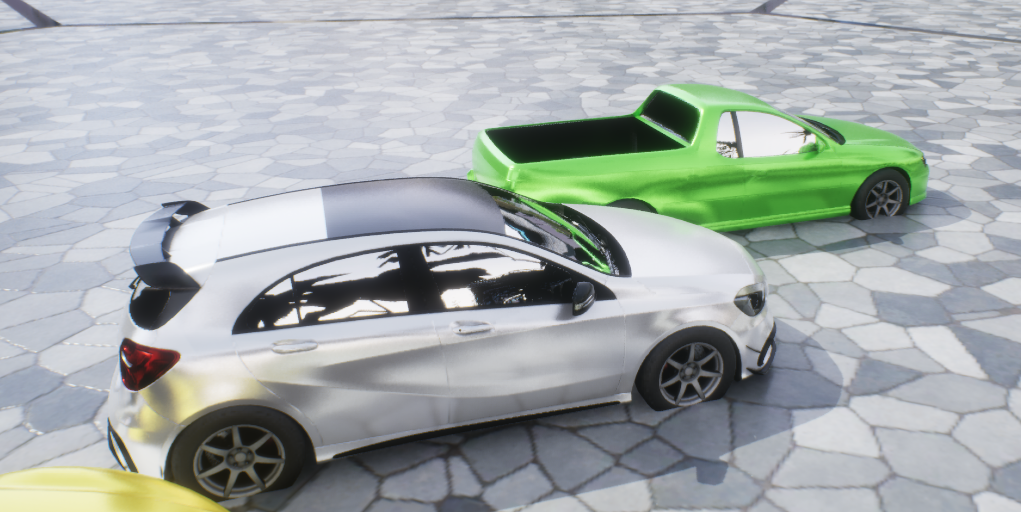
Today I added a couple more functional cars, however I also make the brakes way more functional leading to better vehicle drivability and handling as well as visually locking the back wheels when the handbrake is held.
Cars Day 12 - Functionality
19/05/26
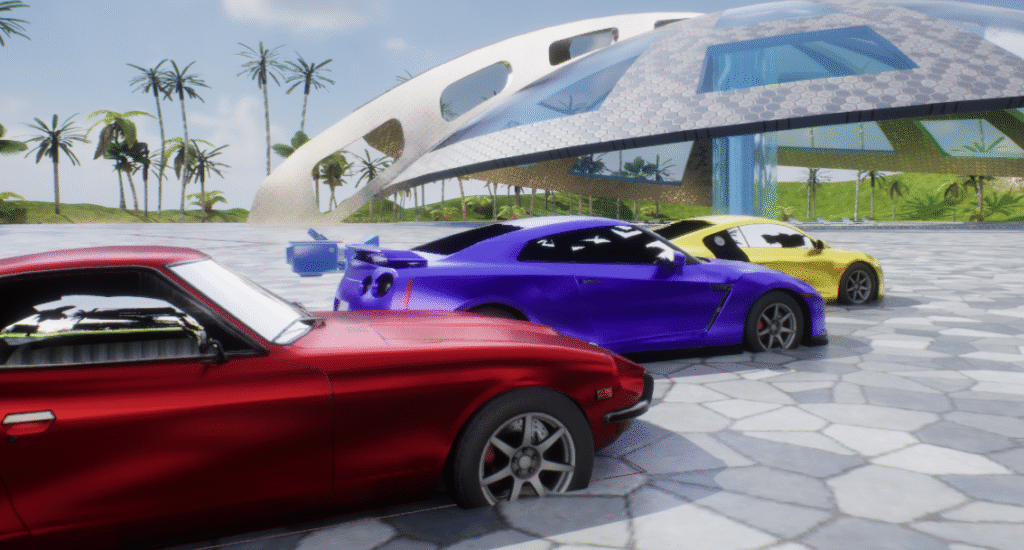
For a while now I will be creating new child blueprints, changing all the static meshes and tuning all the various uproperty values until they feel right. For today I added a coupe of sports coupes giving the game some faster options.
Car Models Day 7 - Finished
18/05/26
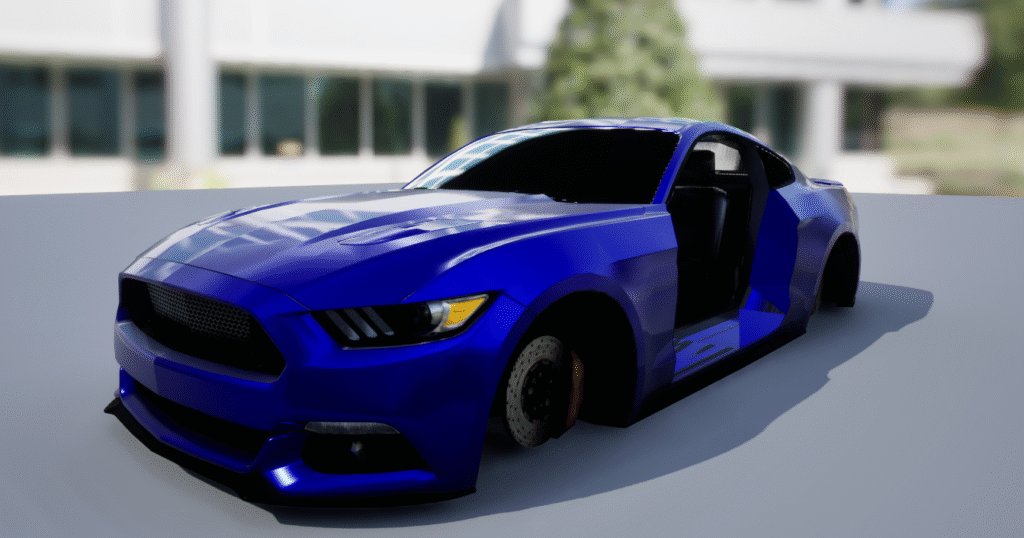
Its finally over, in the end I have 22 car models with separated doors and centred wheels, which is only one less than my original hope because one car model I had was missing some textures, and realistically one less car model isn’t making a difference. Also either finding or making that one texture would have taken way longer than it was worth, either way I’m happy, and it’s finally time to start making all these car models drivable.
Car Models Day 6
17/05/26
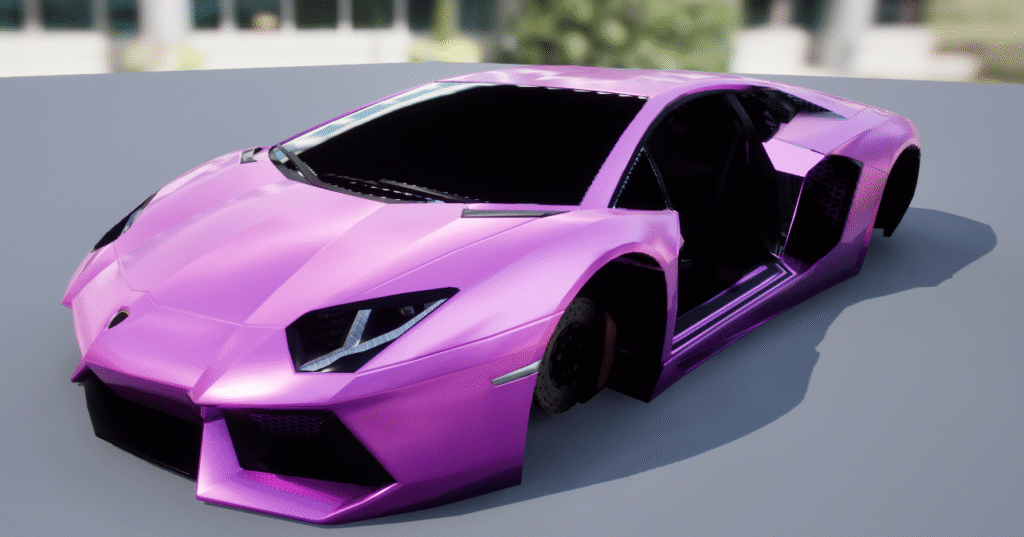
Today I started at around 8am, having pretty much the whole day to get as much done as I can. After working on this for the better part of the entire day, I got through well over half and only have a few more until they are finished. It didn’t help that the design language the modeler used changed around half way through causing me to keep having to change the way I blocked off the doors, and the fact that some randomly had various levels of interiors.
Car Models Day 5
16/05/26
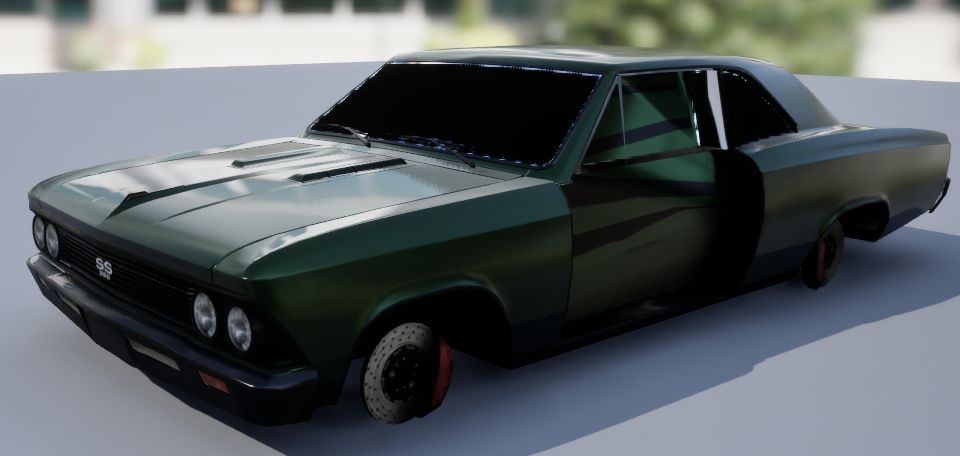
Same again, however today I found a few shortcuts that have made blender much quicker, and with the practise I’ve been getting I can now get a car finished in Unreal in about 20 mins, down from over an hour. I didn’t have too much time after work though so only got a couple of cars done.
Car Models Day 4
15/05/26
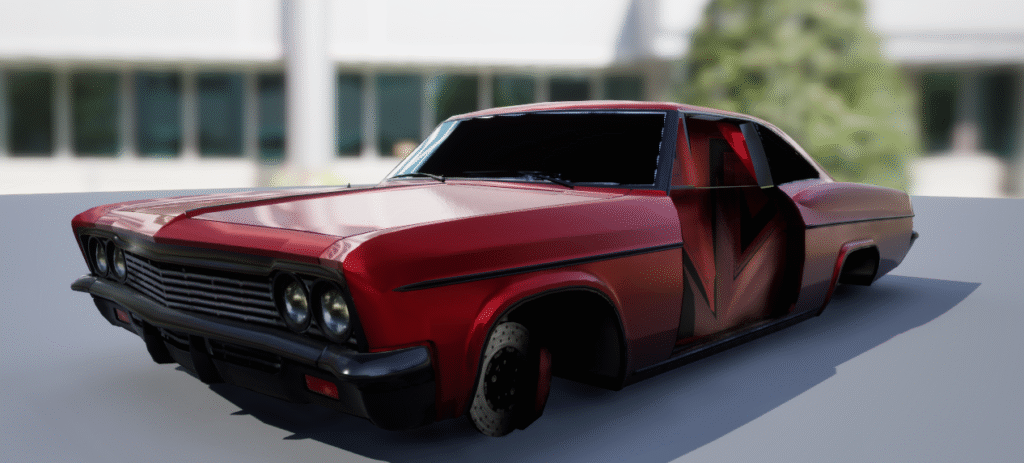
Today was nothing special, I had some time after work and got another car model finished. This is probably going to be the case for the next week, about 19 more models to go, hopefully I get quicker with practise and start remembering which normals to flip.
Cars Day 11 - Finishing Touch
14/05/26
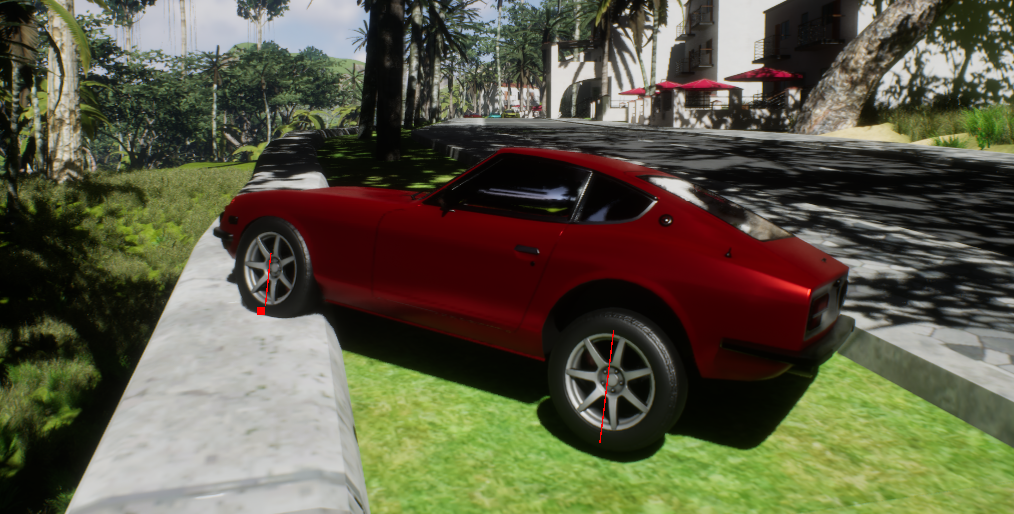
I started today by fixing a big issue with my wheel spinning code from yesterday, which didn’t account for the reversed meshes like the steering did, which I fixed by making a local version of the spin multiplier, and negating it for the flipped meshes causing them to spin backwards. This worked however there was another issue where the wheels span forward regardless of drive direction. To fix this I simply checked the dot product of the vehicles velocity to its forward vector, and if below zero also negating the local spin multiplier. These fixes combined to perfect the wheel spinning. Next I wanted to fix an issue where the vehicle would creep forward on a slope from standstill, a real life solution for which is an auto handbrake system which I decided to replicate. This lead me to re-evaluate my handbrake functionality however, which usually does nothing to assist with stopping the vehicle but rather to activate a form of drift mode like disabling traction control. Instead I added a uproperty handbrake stopping force, which is mapped to speed so that when travelling below a uproperty speed, currently about 5mph, the handbrake force gradually gets considerably stronger. I then have the auto handbrake automatically applied when below 1mph, as long as there is currently no movement input, set straight to the maximum stopping force to eliminate creeping and slow rolling. In more of an effort to stop rolling, specifically when entering and exiting the vehicle, I then proceeded to set both the linear and angular dampening of the vehicle to 1000, halting it instantly whilst retaining the physics based suspension mechanics. Next I realised I never added the delay for entering the car from the passenger side to signify the character sliding across the centre console into the drivers seat to heighten immersion which ended up including some slight adjustments to overall flow. One final big issue that needed tackling was that the player could actually get stuck inside the vehicle which is obviously not ideal. This was because my original idea was that the player would only realistically get out of the driver’s side door, and if it was blocked they would have to move to somewhere where it wasn’t. This however doesn’t work if they get the vehicle stuck in a position where the drivers door is blocked, which is when it now check the passenger door. If the passenger door is clear then a slight delay occurs to again signify the character sliding over the centre, before opening the passenger door and getting out as normal. If both doors are blocked however, there is an emergency third option where the character just spawns on the roof of the car, without any animations, as a last resort to enable the character to get out of the car in a pinch without any real explanation. I think whilst this maybe isn’t the cleanest option it also doesn’t have to be when considering how few cases it should occur, and how complicated my other options would be. For example, for an emergency rare situation it makes no sense to spend a considerable amount of time adding the ability for the character to get out of a window or the boot with animations and realistic enough timing. At the end of the day I think its a bit of an unwinnable situation that I made the best of and as long as it works, I’m happy.
Cars Day 10 - QOL
12/05/26
A massive issue that needed fixing for a while now was curbs, more specifically the fact that a tiny curb was enough to halt or even permanently decommission a car. Whilst in some cases this added a level of realism as hitting a high curb as speed would destroy at least a tire if not way more, it didn’t suit the more arcade focus that makes driving in GTA so fun, and that was the feel I was trying to build off of with this project. This was because due to the non standardised nature of the car models I was using and their origins, I opted to make the root of the vehicle class a box component, which was the size of the vehicles wheelbase, very thin and along the floor for the sake of collisions. This is because before suspension was in the game, there were no upward forces on the car and with gravity enabled, this box component had to be on the floor. However this meant that even the smallest steps in world collisions could be enough to catch the sharp edges of this box component and stop the car, even sometimes getting the box collider stuck within in high speed collisions. I therefore had a theory that I could simply lower the mesh so that the bottom of the car lined up with the box component hoping that the way I had designed the classes hierarchy and the suspension would sort out the rest. This surprisingly worked perfectly and resulted in a true to life ground clearance with fully functional suspension. After this I decided to start work on spinning the wheels in line with movement. I started by redesigning the steering function so that it would be called once in tick rather that for specific wheels in a separate function. It then loops through the wheels array checking that new rear wheel bool to calculate the steering angle for the front wheels only. Also, rather that immediately applying whatever angle it calculated to the front wheel, It simply calculates just a steer angle. This is because a local rotator is created at the start of each for loop containing the current wheel rotation, before applying this new steer angle only to its yaw and leaving the rest. Then for every wheel, a new roll is calculated by multiplying the speed by delta time and a multiplier, before getting its modulus of 360 to ensure the value doesn’t balloon. Finally at the ends of each for iteration the current wheels relative rotation is set to this new rotator to endure that the wheel’s rotation is only being set once, in one place each frame and avoiding redundant or counteractive calls at the same time.
Cars Day 9 - Fixing Stuff
11/05/26
Whilst testing my cars lateral friction again making sure I was happy after refreshing myself on GTA5’s driving physics last night, I ran into a problem that had been annoying me for a while, and that was that the roads collisions were awful. This resulted in everything floating up to a couple of feet above the ground and immensely breaking my immersion. My issue however was that I had no idea how to even see the properties of the roads. Eventually I found out they were splines on the landscape, as well as how to see their properties, but they all looked ok. This is when I started checking old forums on splines and their collisions which is when everything started pointing to using complex collisions as simple collisions. Whilst this would make the game harder to run with more complex collision calculations, this seemed necisarry to have correct collisions not only with the road surface but also on curbs and car parks, all of which had invisible curbs from poor simple collisions. To fix this I simple set complex collisions to be the project default which made the collisions so much better and performance stayed seemingly the same. However, surprisingly this broke my suspension causing my car to be slammed to the floor, turning up the force simply made it lob-sided and turning it up even more or with more dampening simply caused bunny hopping. After hours of adjusting the up vectors used and trying to remove the horizontal axis from the calculations and going in circles on every value I could think of, I was forced to do some research for some different suspension methods. to fix the ride height issue, I added a target ride height uproperty, and compression now was simply the difference between the target ride height and the total suspension length, combined with a floor stopping compression or the suspension force going below zero as I never want the car being puled down whilst being pushed up somewhere else, as this causes the feedback loops. Now with the ride height fixed I had one last problem, when going up hills the car would be on the floor and the opposite when going downhill. This was because the suspension was taking the driving velocity of the car going up a hill into account rather than just the vertical velocity of the suspension. To fix this I converted the global wheel velocity into a local wheel velocity using an inverse transform vector, and then singled out that vector’s Z axis, using this as the vertical velocity, independent of the cars driving velocity.
Cars Day 9 - Suspension
10/05/26
Today I wanted to get suspension working on my car, so I started by learning the basic calculation for the spring force of suspension, which is spring strength, times compression, minus dampening, multiplied by the magnitude of the vertical velocity of the car. After learning this I just had to work out which values should be uproperties, like strength and dampening, and which needed calculating per wheel per frame. Once this was all working I spend a while fine tuning these spring and dampening values at first just to stop the car from bunny hopping but then to ensure it looked correct when driving. This was very difficult with the visual aid of the wheels which were still static so that needed fixing. To achieve this I simply set the wheel to the impact point of the ground trace, then added the cars up vector by a uproperty offset. These combined finished the vehicle suspension however it wasn’t the difficulty of the maths that took all the time up, it was the endless test driving different values to fine tune and go crazy over miniscule differences. Once I was happy, I decided to get the handbrake input I had already set up working. This meant checking each of the rear wheels was on the ground, then finding the dot product of the velocity at the wheel to the cars forward vector. That was then multiplied by the cars negated forward vector and a uproperty handbrake force and added as a force at each grounded wheel. After tuning the this handbrake force, and making it so the car didn’t catapult backwards or drive like nothing was happening, it was time to make this a more entertaining feature. I wanted to make the handbrake a tool for drifting around corners making exploring the island way more fun as well as adding a slight skill gap to learn to driving within the game. To do this I made the handbrake set a bool that’s checked in the lateral friction function, where if true, it reduces the lateral friction of the rear wheels by a uproperty multiplier. This gave me a lot of different qualities to be testing for on my test drives, trying to balance the floatiness of high speeds with the too much steering with too much friction to control drifts. Tuning these values led me to realise that my steering angle needed to change depending on my speed, which I achieved using a mapped range from speed to angle, and this combined with fine tuned lateral friction values at low and high speeds, combined with a good handbrake force and friction modifier has led to a very enjoyable driving experience. I am sure I will end up fine tuning these values in future however right now the car is in a very good feeling state, only really needing the wheels to spin before it looks polished. Then its time to make 23 different looking and feeling cars before the rest of the game in the next four months. One last ting I did today as well was reduce the engine power the closer the vehicle gets to a uproperty max speed to stop them from accelerating forever making the car much more controllable to drive on long straight roads without reaching uncontrollably high speeds or letting go of ‘w’.
Cars Day 8 - Tuning
07/05/26
I started my day walking into a car accidentally and seeing that it moved a little, before realising I could literally push the car round in circles. After checking through the vehicles mass settings which were set to 1000kg, I was confused and decided to look through the character movement component, thinking it must be walking too strongly. This is when I found a variable called push force factor which once turned from 750,000 down to 500, the car didn’t budge as intended. Now I want to make some adjustments to the steering because at low speeds it feels too slippery and unresponsive but at high speeds its uncontrollably grippy. My idea to achieve this is to adjust the lateral friction factor, making it inversely scale with speed. This was done using a mapped range value clamped with an input speed from 0 to 55 mph against an output friction of two uproperty values for min and max friction. Then I simply input the 2D size of the vehicles velocity and it returns an appropriate lateral friction value. This made the car nice enough to properly drive for the first time allowing me to drive it around the entire island. Now I have to fine tune these values until it feels right, not to slippery / grippy at high speed or low speeds by tuning the min and max friction values until it feel right.
Cars Day 7 - Steering
05/05/26
Today I want to get the car steering which should in theory be a very simple job with the lateral friction I set up yesterday. All I need to do is rotate the wheel mesh in the inputted direction by the inputted amount and it should work. To achieve this I made a function called once per input to avoid having movement logic in the input section of my class. This function however just called a utility function that rotates the wheel mesh of a provided wheel data struct using set relative rotation, passing in a rotator with the pitch and roll zeroed and the right input multiplied by the max steering angle for the yaw. This max steering angle is a tuneable uproperty which allows for easy future adjustment to steering angle. This function was then called twice in the previous apply steering function, passing in the right input and the structs for both front wheels, and this is when I spotted an issue. To reduce the amount of static meshes and streamline the process of putting the car pieces together, the same wheel mesh is used on all four wheels, and is rotated 180 in yaw in order to work. This meant that my steering logic would flip the front wheels the wrong way round which meant I had to find a simple way to differentiate these flipped wheels. This lead to the addition of a if statement in the rotate wheel mesh function that checked the pre rotation relative rotation yaw, and if it was above 90 or below -90, this must be one of the flipped wheels therefore 180 was added to the yaw of the new rotator. This created a working steering system first try, also meaning that the untested lateral friction works too, however it looked wrong with the wheels snapping to full lock with any movement input. This lead to a slight change in the steering input. I created a member variable that is set to the inputted steering, and reset to zero when there is no steering input, and then moved the call for the apply steering function into the tick passing through delta time. Then a final input float is created, using interpolation from the member variable current steer input, the frequently updated target steer angle and a tuneable steering speed uproperty. The current steer input member variable is then updated and this all works to create much better smoother steering.
Cars Day 6 - Lateral Friction
04/05/26
Today I Added a drive train enum that allowed each car to be easily changed between FWD, RWD and 4WD. This is achieved by a switch statement on the enum that specifies which wheels to add the force to. I then realised that it went way to fast on 4WD so created a function that divides the engine power float by the number of driving wheels float to allow for easy consistent power. This will allow different classes of vehicles to feel different in how they use their power, as well as providing actual offroad and driving benefits using Unreal’s physics engine. Then to prepare to add steering into the game, I implemented lateral wheel friction, which led to the creation of a wheels array. This replaced the wheel data struct member variables and is filled with grounded check hit results within the struct of wheel data every frame. Now I have an easy to access and updated impact point for every wheel every frame anywhere in the class for only one trace per wheel. Iterating through this array every frame allowed me to get the linear velocity at each impact point, which could be compared to the wheel’s right velocity and a friction force could be applied in the opposite direction. This should all stop wheels from sliding sideways and favour forward by a tuneable value, meaning that when I start rotating wheels for steering, the car should go in the direction of the meshes already.
Cars Day 5 - Movement
03/05/26
Its finally time to get the cars moving and after a lot of thinking and planning the past few days, I think I have a plan. I replaced the scene component root with a box component root with simulate physics enabled and only blocking world static for now to avoid falling through the floor, and I made the body query only. This was to enable the car to interact with the engine’s physics and was the first step to physics based vehicle movement. Next I created a struct that held both the mesh and a trace point for each wheel, saving one for each wheel as a member variable, before creating a function designed to check if a given wheel struct was on the ground. This function traced down from the trace point in the struct by a uproperty float, and returned the hit result. This function was then called in another function, where the returned hit result is then checked for a blocking hit meaning the wheel is on the ground, before calling add force at location at the impact point if there is one. This force is the vehicle’s forward vector, multiplied by a float input passed into the function, multiplied by a uproperty float for the engine force to tune how powerful and fast each car is. This function is called in the move input function for each driving wheel manually, passing in the inputted forward axis.
Cars Day 4 - More Animations
30/04/26
I started today by fixing the exit function, which turns out was only missing the enabling of the characters colliders before working perfectly. It was then time to start improving the entry animations my making the doors open along with the character animations. I decided that perfectly syncing the animations was a lot of work that I don’t think I have the time for with the scope of this project, so I decided to just line up the animations as much as I could and accept the slight gap between the hand and door handle. With attaching the characters hand to a door handle socket now out of the question, I had to decide how to animate the static mesh components for the doors. Considering they had no skeletons, actual animations were out of the question, along side the fact I also didn’t think making almost fifty individual door animations was a good use of my time either. This lead me to the idea of using a timeline blueprint node that could be easily adjusted, that returns a float that becomes the yaw of a rotator, that is applied to the door every frame of the timeline. Whilst this was achieved in blueprint I believe it was the cleanest solution to achieve the adjustability I required whilst also being a time and performance efficient solution. Finally to correctly trigger this blueprint function, I added an anim notify to the character animations for when they’re about to open the door, this then calls a function on the anim instance class that follows the same path to the vehicle class as the possession notify, calling a blueprint implementable function. As some finishing touches to make sure this all lined up correctly, I added a couple of scene components positioned in front of the doors to position the character to before the animations leading me to another decision, so I snap or lerp. Whilst lerping would be theoretically cleaner, it would have to be so quick it would be hardly noticeable and with the distance and position checks before entry, snapping would result in a similar effect for less cost or timing difficulty. And then I did pretty much the same but in reverse for getting out of the car. When I press to open the door and its successful, the vehicle state is set to transition and the door opens, which on completion calls a separate function to show the player, enable its collision and play the exit animation. That function also possesses the character and corrects the input context and sets the vehicle state to parked while the animation is playing until it triggers a notify, which causes the door to close in time with the animation.
Cars Day 3 - Animations
28/04/26
Now for my least favourite process to begin, animations. And shocker, they are not going smoothly at all. I started by finding some animations for getting in and out of a car, mirrored them using UE5.6s new modifiers and added them to a montage which I am trying to play, however have been hitting repeated walls. My collision isn’t turning off, my root motion isn’t working properly, my montage wasn’t jumping to the right sections and now isn’t playing animations but it playing the root motion. Now I have it playing the right animation, after learning more about animation slots and fixing the animation selection logic, that was checking an incorrect enum, its time to start work on possession timing. I decided to achieve this with an anim notify. To achieve this I call a function on the anim instance, which calls a function on the player controller, which gets the most recently interacted with vehicle from the player and calls the original posses vehicle function. This avoids the character and vehicle classes having to include each other which shouldn’t be needed as they are independent, only relying on the player controller, which should know about the pawns it possesses. Now I just have to fix my exit function next time as the player doesn’t reset properly, unable to move and without animations but still rotating in the direction of input and able to get back in the car.
Cars Day 2 - Possession
27/04/26
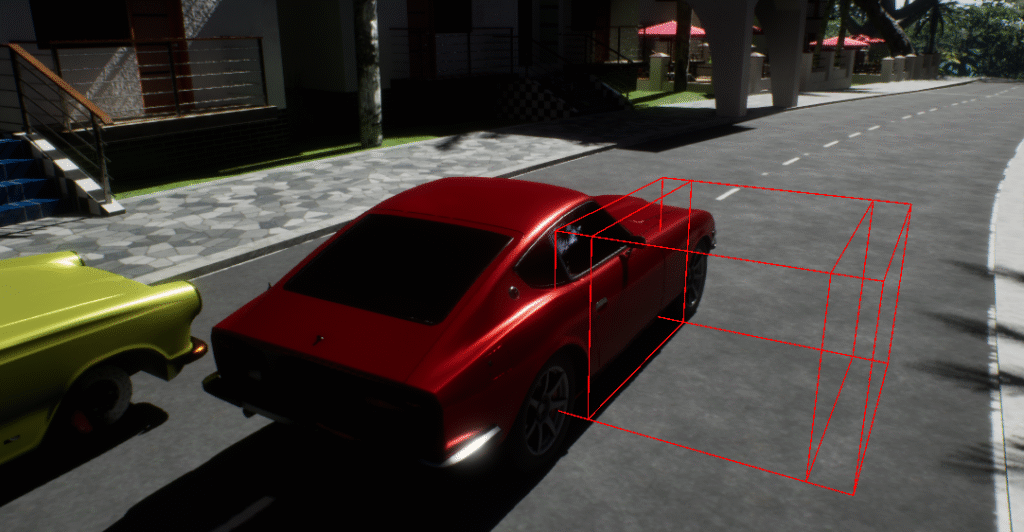
After taking a few days off around my birthday I was back to get the character getting in and out of the car. I started today by adding the possession logic to the vehicle class, possessing the car pawn, before attacking the character to a empty ‘socket’ scene component positioned outside the drivers door in blueprint. The character is then hidden with its collision disabled and the vehicle state is set to player, confirming the player has successfully entered the vehicle. Finally the input needed to be added for vehicles to allow camera movement, getting out and eventually vehicle movement. To achieve this cleanly with the enhanced input system I moved all input context related logic to a new player controller where a base and on foot context are added at the start of the game. A public function on the player controller can then be called to switch the on foot context for a vehicle context and vice versa. With this working I then copied the camera movement function from the player and set up callbacks for other inputs I knew I would be adding in future, filling them with logs for testing. Finally I completed the exit function I created last time so that it first checked for obstacles outside the drivers side door, using the same function as for getting in, before adjusting the vehicle state to transition, possessing the most recent instigating character, telling the player controller to change input back to on foot and detach the character. The Character is then made visible with collision enabled outside the drivers door. Animation for all of this will be the next step however I have set up the switch and if statements that differentiate between vehicles with NPC drivers and without, as well as which door the player is entering, all that’s left is the player entering montage, player exit animation and the eventual addition of an exiting NPC when they are added. I started this blog to highlight the issues I face day to day but have been extremely lucky, facing nothing more than some missed parenthesis or some flipped logic in an if check, for which I am both grateful and proud.
Cars Day 1 - Entry Checks
23/04/26
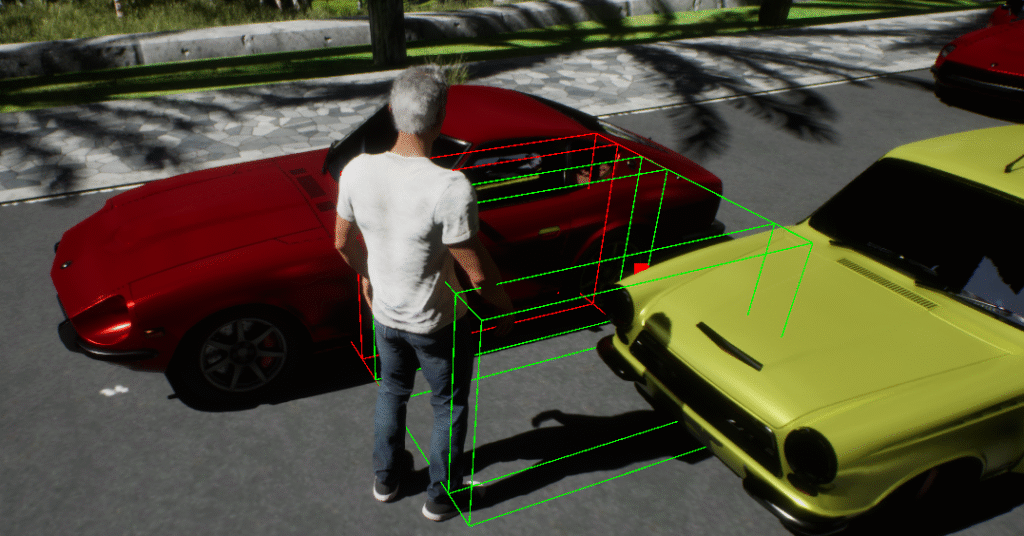
I did a lot today and am very happy with the results. To start with I created a vehicle class and set it up with all of the various mesh components, that could then be positioned within the blueprint editor. I then created an interact interface that would allow character input to call functions in other classes without casting or includes. This interface was then linked to an interact input action in the character class, that would get all interactable actors within a given range, then find the closest in that array before calling an interact function on the interface. Then on the vehicle, after receiving this interact input from the interface, it would determine whether the player was trying to enter or exit the vehicle using an enum on the vehicle called vehicle state. So far exit does nothing however the enter case goes on to verify if the character can actually enter the vehicle. It starts by checking if the character is actually stood by a door, rather than just by the car using a distance check, before using a single box trace to check for any obstacles in front of the door that would block any entry animations. Provided there are no obstacles, an enter function is then called.
Car Models Day 3
17/04/26
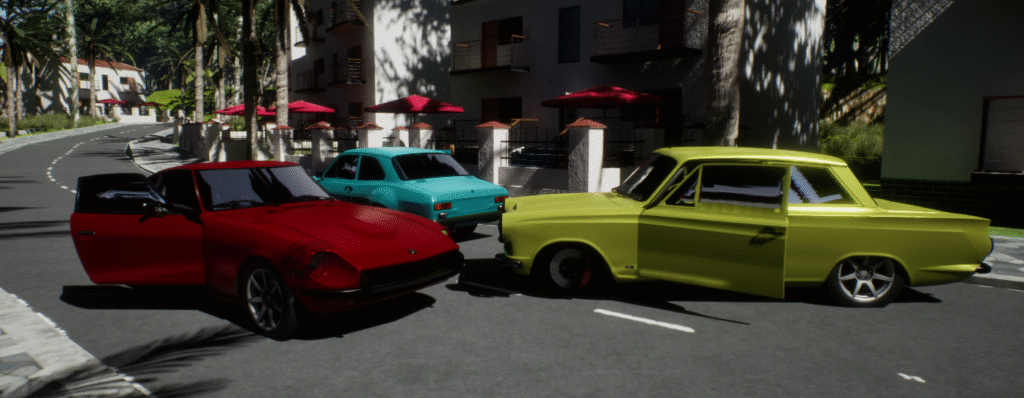
It was just a little more practise after work splitting up the car models today. By far the most tedious part of this process is fixing the normals to make sure that my edits don’t allow the player to see through the car models. I don’t really want to put much more time into this yet before testing out my ideas of how to bring these cars to life, to make sure that no more edits need to be made in order for these cars to work. Right now the things I have planned for are fixing the pivot points on the wheels allowing them to rotate around the centre and spin properly and I have been separating and correcting the pivot point of the car doors allowing them to easily open. I’m hoping I can get away without separating the callipers and that the player wont notice them being static e.g. if I add suspension and when I start turning the front wheels.
Car Models Day 2
15/04/26
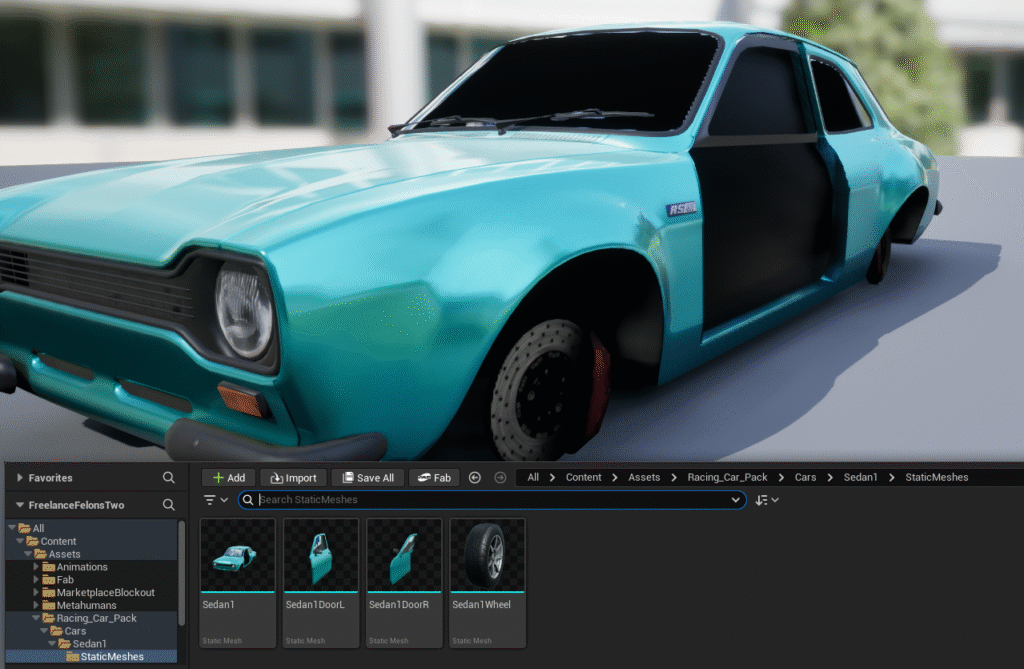
Today I started the tedious process of altering all of the car models allowing thinks such as the wheels to spin and the doors to open, before creating their materials. This meant re-familiarizing myself with Blender to separate the models into separate pieces and fix their origins. This took a long time to figure out and learn how to do by teaching myself and googling shortcuts that I learnt whilst making a doughnut over a year ago. at the end of the day I am two of twenty three cars down, however I at least now know the method that should hopefully speed up future days. I also bought some more metahuman clothes for when its time to design an array of NPCs and story characters as there was a sale on.
Character Movement Day 7
14/04/26
I started my day getting the sneaking animations working, creating a separate blend-space along with a state machine in my animation blueprint. I then switched between a locomotion and sneak state based on a bool in my anim instance that checks if my characters locomotion state is equal to sneak. I’ve also got the jump animations working, with jump up, loop and down in separate states and the anim instance checking the character movement components IsFalling bool as well as if its in the jump state. One thing I am struggling with is deciding whether to go back to the pre jump state like sprinting or sneaking or just to automatically boot the character back to walking.
Character Movement Day 6
12/04/26
Today I got imported and retargeted some locomotion animations, before creating an animation blueprint to show a blend-space. Then, to feed my characters speed to the animation blueprint I created an anim instance class that accesses a speed getter on the player. I also fixed a bug where the pitch of the camera and controller impacted the speed of the player, where looking at the floor would set the speed to almost zero as well as adding auto cancel sprint for if the character stops moving or hits an obstacle.
Car Models Day 1
11/04/26
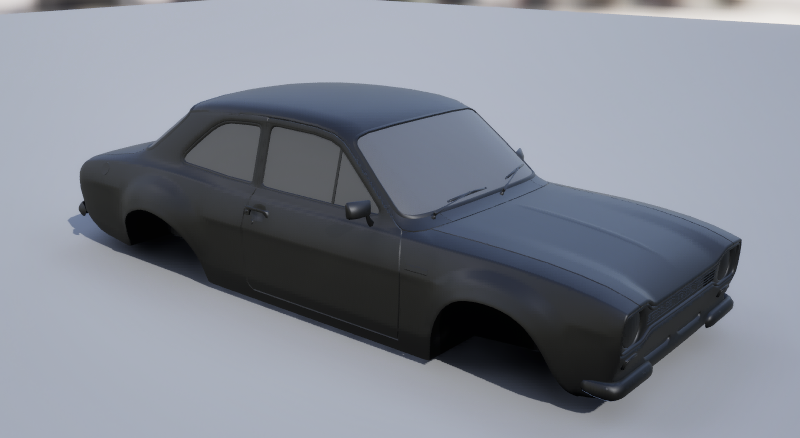
Today I found a very good and diverse car pack with high quality models, however I have struggled a lot to import them to UE as only FBX files were provided. This will mean individually creating and assigning materials with the provided textures. Also in future I may have to edit these models in blender to separate the doors for when the player gets in and out as phasing through a closed door with definitely break immersion. For now I will just leave the car models until I have some finished car mechanics and have more insight into how they will work, but al least I have seen the models and can envision my next steps now.
Character Models Day 2
10/04/26
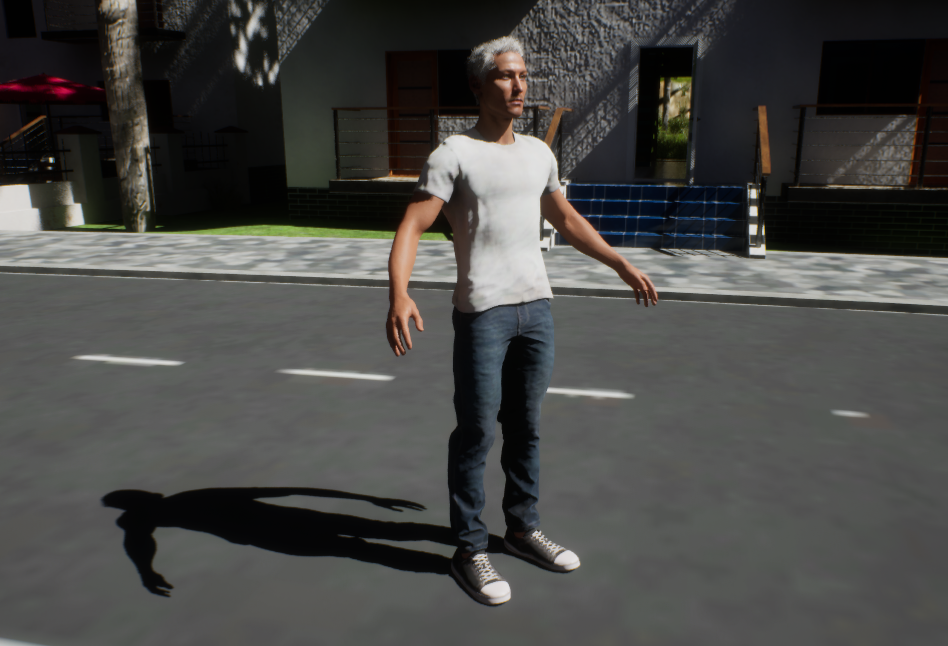
Today I managed to import some clothing I found on Fab, making my character look more like a civilian. I also spent time making separate materials for every colour option for each piece of clothing. This all should allow the same basic outfit to have a huge amount of variation and bring much more of a lifelike feeling to the world. Now that I have a workflow that functions, I can spend time creating many more characters, and importing more clothing options from Fab until I am happy I have the variation for both NPCs and story characters.
Character Models Day 1
08/04/26
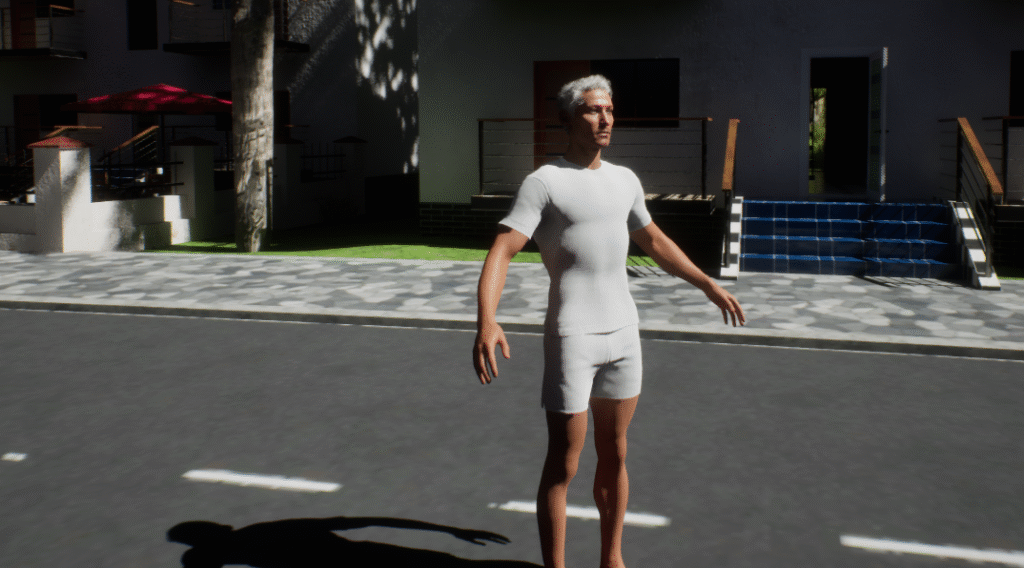
Today I have spent a lot of time learning how to make metahumans. I decided this would be the best approach to having a variety of faces in the world in order to make it feel realistic. I also spent a lot of time searching fab for various outfit options that could add even more variation. I feel as though characters are the type of thing I need to make feel lifelike in order to consider this game a success and I will therefore most likely spend a lot of time and money trying to get a big enough array of blueprint metahumans for the player character, story characters and NPCs. I also did a bit of research into how to animate these assets as well as looking around fab for some car models to use in future.
Character Movement Day 5
05/04/26
Today I finished the basic locomotion including sprint, sneak and jump. Whilst these are very basic actions, I want to keep to my goal of making robust, maintainable and well structured systems that could be expanded easily. This is when I had an idea that would eliminate the risk of overlapping contrasting inputs that would be problematic had I linked input directly to movement speed, that involved making an enum for locomotion state. To start with, the inputs for sprinting and sneaking would only be linked to a function to call the setter for the enum. This would pass in the opposite of whatever its current value was to replicate GTA’s iconic toggle sprint feel. Once the enum was set, the setter would call another function containing a switch statement that would only call the function for the most recent input which could then change the players speed. I was also shocked that this system I had designed worked exactly as intended first try.
Character Movement Day 4
03/04/26
Today I got the basic movement finished, allowing conventional third person movement. I found that my error yesterday was that I didn’t take into account the camera or controller direction. To fix this I used the kismet get forward and right vector functions, and multiplied those scaler value directions by the magnitude of the character input. This gave me a forward and right movement vector that took into account the players look direction and these two vectors could be added for a final movement vector.
Character Movement Day 3
02/04/26
After getting the Mouse inputs working yesterday, I started off by finding the settings that allowed my camera to follow them today, making looking around complete. Knowing the bools like bUseControllerDesiredRotation and bUsePawnControlRotation is something I foresee being one of the biggest challenges of this project. I also have some working movement, however it doesn’t take into account the controller / camera direction so I will have to make some adjustments.
Character Movement Day 2
01/04/26
Today I’ve been trying to add functionality to my look function from memory, rather than looking through old code and not testing myself. This has meant slow progress in the little time I have however will be much more beneficial long term which is the ultimate goal. So far horizontal looking is working however vertical is not, likely to do with controller or character movement settings rather than code, but still something I would like to solve without videos, AI or past code and instead with forums or ideally documentation.
Character Movement Day 1
31/03/26
This project has been very intimidating for me to start, I think “remake GTA” was a bit of an extreme scope, but you need to find your limits to push them I guess. For today I managed to get the Github repo setup with LFS so all my work would be backed up easily. I also managed to start work on the character input, using enhanced input to link a basic context to some functions that for now just prints debug logs. Also in an effort to future proof for when vehicles are added, I separated my inputs to two separate contexts to allow different inputs while walking and driving, along with a base context for looking and movement.
Hello World
29/03/26
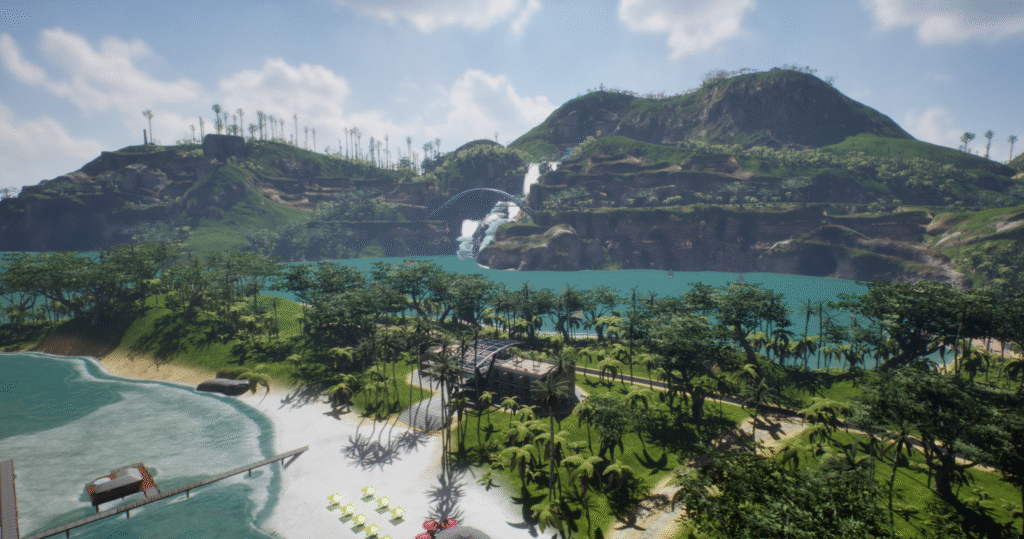
One Day or Day One. I have finally got round to starting the project of my dreams. I’ve also got round to learning how to blog, hopefully. Here I will provide a timeline into the creation of this project, and a look into the day to day struggles and successes when trying to make a game with such a huge scope and not much experience. All I know is I am guaranteed to learn a lot over the next five months no matter this result. To start this project, I imported this FAB tropical island by F.S.S into a blank UE 5.7 project, after lots of issues migrating it over from 5.6 before just copying over the files in file explorer. Whilst probably not optimal or ideal this seemed to work and after a bit of a look around I called it a night.